Popular Posts

Showing posts with label Marantec Remotes - Programming. Show all posts

Tuesday, April 23, 2019

How To Program a Remote to Your Marantec EOS Opener


Marantec M4500e Garage Door Opener 


Below are instructions on how to program a new remote into a Marantec M4500e, M4700e, or M4900e garage door opener.

Important: if you have a working remote then scroll down and follow the Programming Additional Remotes instructions otherwise start with the Programming One Remote instructions.

If you have one of the Marantec EOS garage door openers (models M4500e, M4700e and M4900e) and don't have any working remotes then you'll need to program one remote into the unit. Any additional remotes that you want to use with the opener will have to be programmed by using a Programming Jumper.

You can program a Marantec Digital 382 2-button remote, Digital 384 4-button remoteM3-3313 Key Chain Remote, M3-2312 2-button remote (discontinued model) or a M3-2314 4-button remote
   (discontinued model) into the powerhead by following the instructions below.

*As a side note: "universal" style remotes found in box stores and hardware stores are NOT compatible with Marantec garage door openers. Only Marantec brand remotes work with the Marantec operators.


PROGRAMMING ONE REMOTE
*Look at the powerhead (motor unit on the ceiling) and you'll see the eight Red LED lights and the three programming buttons (P, +, -)
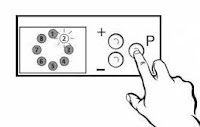
  1. Press and HOLD the "P" button for about 3 seconds
  2. LED lights #8,1 & 2 will light up solid
  3. Press & RELEASE the "P" button 2 times
  4. Now LED lights #6, 7, & 8 should be lit up
  5. Press & HOLD the button on the remote that you would like to use to operate the opener
  6. While you are holding the remote button you should see #7 LED light flash rapidly
  7. Now release the remote button
  8. Push and RELEASE the "P" button one time & you will exit the programming mode
  9. Congratulations....you just programmed the remote
PROGRAMMING ADDITIONAL REMOTES
Now, what if you have additional remotes that you want to program? This is where the programming jumper comes into play and it looks like this:
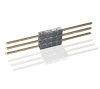
 Here are the instructions to program additional remotes using the program jumper after you programmed one remote into the opener:
  • You connect the jumper between the existing programmed remote and the new remote
  • Press and HOLD the button on the existing remote that currently works your opener
  • Then press & HOLD the button on the new remote that you want to work the opener 
  • The LED light on the remotes flicker & you're done.


You can shop for Marantec garage door opener replacement remotes, wireless keypad, replacement batteries and operator parts at the Garage Door Zone Store


https://www.garagedoorzone.com/Marantec_c11.htm


Friday, August 17, 2018

Marantec Synergy 370 & 380 Operators - Programming A Remote

Below are instructions on programming a garage door remote to the Marantec model Synergy 370 and 380 operators. You'll only use the instructions below if you don't have any remotes programmed to the operator. The Marantec operators can only hold the code of one remote. Additional remotes copy the code of the one programmed remote so if you are looking to program additional remotes check out the blog post Programming Marantec Remote Video here. However, what do you do if you don't have an existing remote (perhaps you lost it or you just moved into the home and they didn't leave you a remote). Here's a rundown on how to program a new remote by using the buttons on the powerhead (motor) unit on the ceiling.


Here is what the programming buttons look like on the powerhead that you will use to program the remote:

Synergy 370 & 380 Program Buttons & Display
LED Display


Program the remote into the opener powerhead by using the "+", "-", and "P" buttons on the powerhead. Here is a rundown on how to program the remote using the buttons on the powerhead unit on the ceiling. You should see 3 red buttons:  "+"button / "-"button / "P" button.

TO PROGRAM A REMOTE (or make/change any adjustment):
 
Press and hold the "P" button for approximately 3 seconds. When
the display of the DOOR OPEN POSITION on the LED Display illuminates release the button.
You are now ready to set or change the desired adjustment.

Press and release the "P" button until the REMOTE CONTROL icon on the LED DISPLAY is illuminated

The opener can now learn the code of the hand-held remote transmitter. 

Press and hold the button on the remote transmitter.

Release the remote transmitter button. The opener has now learned the particular
code of this transmitter.
http://www.garagedoorzone.com/M13-631-Marantec-Garage-Door-Opener-Keyless-Entry-Keypad-104053.htm
M13-631 Keyless Entry

Once the opener has successfully received the code from the
transmitter, press and release the "P" button. This stores the
code in memory. It also completes the adjustment setting
sequence, and completes the program process.


The ON icon should now be illuminated on the LED DISPLAY and the opener is ready for operation.


 And that's how you program a remote to the Marantec Synergy 370 and 380 operators. Remember if  you need to program additional remotes you can see the video on how to use the programming jumper here.

Do you need a new remote for your operator? You can purchase the Digital 382 Marantec remote here (it replaces the old discontinued M3-2312 remote). In the market for a wireless keyless entry? You can find the Marantec M13-631 Keyless Entry here.


https://www.garagedoorzone.com/Search-All-Marantec-Parts_c33.htm


Digital 382 Remote                                        

Marantec Synergy 270 Opener - Programming A Remote


Below are instructions on programming a garage door remote to the Marantec model Synergy 270 operator. You'll only use the instructions below if you don't have any remotes programmed to the operator. The Marantec operators can only hold the code of one remote. Additional remotes copy the code of the one programmed remote so if you are looking to program additional remotes check out the blog post Programming Marantec Remote Video here. However, what do you do if you don't have an existing remote (perhaps you lost it or you just moved into the home and they didn't leave you a remote). Here's a rundown on how to program a new remote by using the buttons on the powerhead (motor) unit on the ceiling.


Synergy 270 Operator

Here is what the programming buttons look like on the powerhead that you will use to program the remote:

Synergy 270 Program Buttons & Display
LED Display


Program the remote into the opener powerhead by using the "+", "-", and "P" buttons on the powerhead. Here is a rundown on how to program the remote using the buttons on the powerhead unit on the ceiling. You should see 3 red buttons:  "+"button / "-"button / "P" button.

TO PROGRAM A REMOTE (or make/change any adjustment):
 
Press and hold the "P" button for approximately 3 seconds. When
the display of the DOOR OPEN POSITION on the LED Display illuminates release the button.
You are now ready to set or change the desired adjustment.

Press and release the "P" button until the REMOTE CONTROL icon on the LED DISPLAY is illuminated

The opener can now learn the code of the hand-held remote transmitter. 

Press and hold the button on the remote transmitter.

Release the remote transmitter button. The opener has now learned the particular
code of this transmitter.
http://www.garagedoorzone.com/M13-631-Marantec-Garage-Door-Opener-Keyless-Entry-Keypad-104053.htm
M13-631 Keyless Entry

Once the opener has successfully received the code from the
transmitter, press and release the "P" button. This stores the
code in memory. It also completes the adjustment setting
sequence, and completes the program process.


The ON icon should now be illuminated on the LED DISPLAY and the opener is ready for operation.


 And that's how you program a remote to the Marantec Synergy 270 operator. Remember if  you need to program additional remotes you can see the video on how to use the programming jumper here.

Do you need a new remote for your operator? You can purchase the Digital 382 Marantec remote here (it replaces the old discontinued M3-2312 remote). In the market for a wireless keyless entry? You can find the Marantec M13-631 Keyless Entry here.

Digital 382 Remote

Friday, March 10, 2017

Marantec M55 Operator - Programming The Garage Door Remote


Below are instructions on programming a garage door remote to the Marantec model M55 operator. You'll only use the instructions below if you don't have any remotes programmed to the operator. The Marantec operators can only hold the code of one remote. Additional remotes copy the code of the one programmed remote so if you are looking to program additional remotes check out the blog post Programming Marantec Remote Video here. However, what do you do if you don't have an existing remote (perhaps you lost it or you just moved into the home and they didn't leave you a remote). Here's a rundown on how to program a new remote by using the buttons on the powerhead (motor) unit on the ceiling.


Marantec M55 Operator


Here is what the programming buttons look like on the powerhead that you will use to program the remote:

M55 Program Buttons & Display
LED Display


Program the remote into the opener powerhead by using the "+", "-", and "P" buttons on the powerhead. Here is a rundown on how to program the remote using the buttons on the powerhead unit on the ceiling. You should see 3 red buttons:  "+"button / "-"button / "P" button.

TO PROGRAM A REMOTE (or make/change any adjustment):
 
Press and hold the "P" button for approximately 3 seconds. When
the display of the DOOR OPEN POSITION on the LED Display illuminates release the button.
You are now ready to set or change the desired adjustment.

Press and release the "P" button until the REMOTE CONTROL icon on the LED DISPLAY is illuminated

The opener can now learn the code of the hand-held remote transmitter. 

Press and hold the button on the remote transmitter.

Release the remote transmitter button. The opener has now learned the particular
code of this transmitter.

Once the opener has successfully received the code from the
transmitter, press and release the "P" button. This stores the
code in memory. It also completes the adjustment setting
sequence, and completes the program process.


The ON icon should now be illuminated on the LED DISPLAY and the opener is ready for operation.


 And that's how you program a remote to the Marantec M55 operator. Remember if  you need to program additional remotes you can see the video on how to use the programming jumper here.

Do you need a new remote for your operator? You can purchase the Digital 382 Marantec remote here (it replaces the old discontinued M3-2312 remote). In the market for a wireless keyless entry? You can find the Marantec M13-631 Keyless Entry here.

Digital 382 Remote

http://www.garagedoorzone.com/M13-631-Marantec-Garage-Door-Opener-Keyless-Entry-Keypad-104053.htm
M13-631 Keyless Entry


http://www.garagedoorzone.com/Search-All-Marantec-Parts_c33.htm


Thursday, March 9, 2017

Marantec Q7500 and Q7700 - Programming Garage Door Opener Remote


Below are instructions on programming a garage door remote to the Marantec model Q7500 and model Q7700 operators. You'll only use the instructions below if you don't have any remotes programmed to the operator. The Marantec operators can only hold the code of one remote. Additional remotes copy the code of the one programmed remote so if you are looking to program additional remotes check out the blog post Programming Marantec Remote Video here. However, what do you do if you don't have an existing remote (perhaps you lost it or you just moved into the home and they didn't leave you a remote). Here's a rundown on how to program a new remote by using the buttons on the powerhead (motor) unit on the ceiling.


Q7500 Marantec Opener
Q7700 Marantec Opener


Here is what the programming buttons look like on the powerhead that you will use to program the remote:

Program the remote into the opener powerhead by using the "+", "-", and "P" buttons on the powerhead. Here is a rundown on how to program the remote using the buttons on the powerhead unit on the ceiling. You should see 3 red buttons:  "+"button / "-"button / "P" button. There are also 4 numbered red LED lights.

TO PROGRAM A REMOTE (or make/change any adjustment):
 
Press and hold the "P" button for approximately 2 seconds. When
all LEDs illuminate and LED #1 begins to blink, release the button.
You are now ready to set or change the desired adjustment.

Press and release the "P" button until the #3 LED is blinking

The opener can now learn the code of the hand-held transmitter. 

While LED#3 is blinking, press and hold the button on the transmitter.

When you see LED #3 flashing rapidly, you can release the transmitter button. The
opener has now learned the particular code of this transmitter.

Once the opener has successfully received the code from the
transmitter, press and release the "P" button. This stores the
code in memory. It also completes the adjustment setting
sequence, and completes the program process. The LEDs will
automatically fade out in a circular pattern, which indicates that
the program mode is complete.
LED #4 should now be illuminated, and the opener is ready for
operation.


 And that's how you program a remote to either the Marantec Q7500 or Q7700 operator. Remember if  you need to program additional remotes you can see the video on how to use the programming jumper here.

Do you need a new remote for your operator? You can purchase the Digital 382 Marantec remote here (it replaces the old discontinued M3-2312 remote). In the market for a wireless keyless entry? You can find the Marantec M13-631 Keyless Entry here.

Digital 382 Remote

http://www.garagedoorzone.com/M13-631-Marantec-Garage-Door-Opener-Keyless-Entry-Keypad-104053.htm
M13-631 Keyless Entry


http://www.garagedoorzone.com/Marantec_c29.htm?sourceCode=blogq75007700

Saturday, February 25, 2017

Marantec M4500 & M4700 Openers - Programming The Garage Door Remote


Below are instructions on programming a garage door remote to the Marantec model M4500 and model M4700 operators. You'll only use the instructions below if you don't have any remotes programmed to the operator. The Marantec operators can only hold the code of one remote. Additional remotes copy the code of the one programmed remote so if you are looking to program additional remotes check out the blog post Programming Marantec Remote Video here. However, what do you do if you don't have an existing remote (perhaps you lost it or you just moved into the home and they didn't leave you a remote). Here's a rundown on how to program a new remote by using the buttons on the powerhead (motor) unit on the ceiling.

Marantec M4700 Operator

Marantec M4500 Operator


Here is what the programming buttons look like on the powerhead that you will use to program the remote:

Program the remote into the opener powerhead by using the "+", "-", and "P" buttons on the powerhead. Here is a rundown on how to program the remote using the buttons on the powerhead unit on the ceiling. You should see 3 red buttons:  "+"button / "-"button / "P" button. There are also 8 numbered red LED lights.

TO PROGRAM A REMOTE (or make/change any adjustment):
 
Press and hold the "P" button for approximately 2 seconds. When
all LEDs illuminate and LED #2 begins to blink, release the button.
You are now ready to set or change the desired adjustment.

Press and release the "P" button until the #7 LED is illuminated

LED #7 should be blinking. The opener can now learn the code
of the hand-held transmitter. While LED#7 is blinking, press and
hold the button on the transmitter.

When you see LED #7 flashing rapidly, you can release the transmitter button. The
opener has now learned the particular code of this transmitter.

Once the opener has successfully received the code from the
transmitter, press and release the "P" button. This stores the
code in memory. It also completes the adjustment setting
sequence, and completes the program process. The LEDs will
automatically fade out in a circular pattern, which indicates that
the program mode is complete.
LED #8 should now be illuminated, and the opener is ready for
operation.


 And that's how you program a remote to either the Marantec M4500 or M4700 operator. Remember if  you need to program additional remotes you can see the video on how to use the programming jumper here.

Do you need a new remote for your operator? You can purchase the Digital 382 Marantec remote here (it replaces the old discontinued M3-2312 remote). In the market for a wireless keyless entry? You can find the Marantec M13-631 Keyless Entry here.

Digital 382 Remote

http://www.garagedoorzone.com/M13-631-Marantec-Garage-Door-Opener-Keyless-Entry-Keypad-104053.htm
M13-631 Keyless Entry


http://www.garagedoorzone.com/Search-All-Marantec-Parts_c33.htm

Thursday, February 16, 2017

Marantec Digital 382 Remote Replaces M3-2312 Remote

At the end of 2016 Marantec introduced the new Digital 382 2-button Remote. Marantec discontinued the M3-2312 2-button remote.
Digital 382 Remote


Here is the new Marantec Digital 382 2-button Remote.
It functions and programs the same as the old M3-2312
Remote. It is slightly thinner and has two buttons that can
be programmed to two different Marantec operators. It also
has a red LED light on the front that glows when either
old M3-2312 Remote
button is pushed. It also has a visor clip on the back of
the remote.

One minor difference between the Digital 382 Remote
and the M3-2312 Remote is that the new remote doesn't
have the small hole near the bottom of the remote that
the M3-2312 Remote did. Not a big deal but some
homeowners would use that hole to attach the remote
to a keychain. We recommend that you purchase the
M3-3313 Remote if you wish to put the remote on a
keychain.

The remote works on the current 315MHz frequency that the Marantec operators use (which is the same frequency the M3-2312 used).

The Digital 382 2-button Marantec Remote is now available and can be purchased at the Garage Door Zone Store.


http://www.garagedoorzone.com/382-Digital-Marantec-2-Button-Garage-Door-Opener-Remote-122436.htm?sourceCode=blog021617

Saturday, October 11, 2014

Replacement Remote For Marantec Mac-Lift Elite 2007 Garage Door Opener

Do you have a Marantec Mac-Lift III Elite 2007 garage door opener with a broken or missing garage door remote?  Marantec no longer offers the original remotes listed here:
  •  ML-1401, ML-1402, ML-1404, ML-2401, ML-2402, ML-2204 (40MHz frequency)
  •  ML-1391, ML-1392, ML-1394,ML-2391, ML-2392, ML-2394 (390MHz frequency)
If you have one of the discontinued remotes listed above then 
there is a simple solution to finding a replacement remote. You'll need to add a 75424 Plug-in Radio Receiver. Marantec offers this replacement kit to replace all of the obsolete radio controls.

Installing the 75424 Plug-in Radio Receiver Set is pretty easy. The radio receiver unit plugs into an electrical outlet. Two wires are then run from the receiver to the powerhead motor unit (2-strand wire included with the set). After the wires are connected press the program button on the receiver unit then press the button on the M3-2312 Remote (included with the set). The remote is now programmed to the receiver and will open and close the door.
http://www.garagedoorzone.com/75424-Marantec-Garage-Door-Opener-Plug-In-Radio-Receiver-Set-75424.htm

It's a simple solution to a common problem and should give you many more years of use from your Marantec Mac-Lift Deluxe 2005 garage door opener. You can find the 75424 Plug-in Radio Receiver Set here along with other packages including two remotes and keyless entry.

Replacement Remote For Marantec Mac Lift Deluxe 2005 Garage Door Opener

Do you have a Marantec Mac-Lift Deluxe 2005 garage door opener with a broken or missing garage door remote?  Marantec no longer offers the original remotes listed here:
  •  ML-1401, ML-1402, ML-1404, ML-2401, ML-2402, ML-2204 (40MHz frequency)
  •  ML-1391, ML-1392, ML-1394,ML-2391, ML-2392, ML-2394 (390MHz frequency)
If you have one of the discontinued remotes listed above then there is a simple solution to finding a replacement remote. You'll need to add a 75424 Plug-in Radio Receiver. Marantec offers this replacement kit to replace all of the obsolete radio controls.

Installing the 75424 Plug-in Radio Receiver Set is pretty easy. The radio receiver unit plugs into an electrical outlet. Two wires are then run from the receiver to the powerhead motor unit (2-strand wire included with the set). After the wires are connected press the program button on the receiver unit then press the button on the M3-2312 Remote (included with the set). The remote is now programmed to the receiver and will open and close the door.
http://www.garagedoorzone.com/75424-Marantec-Garage-Door-Opener-Plug-In-Radio-Receiver-Set-75424.htm

It's a simple solution to a common problem and should give you many more years of use from your Marantec Mac-Lift Deluxe 2005 garage door opener. You can find the 75424 Plug-in Radio Receiver Set here along with other packages including two remotes and keyless entry.


Friday, April 1, 2011

Programming Marantec Remote Video

Here's a new video that will show you how to program a Marantec remote (like the, Digital 382M3-2312, M3-3313 or M3-2314). using a Programming Jumper. You'll use the Programming Jumper to transfer the code from a remote that is already programmed into the operator to additional remotes..You only have one remote programmed into the operator...all additional remotes are basically "cloned" from the programmed remote using the Programming Jumper.

You'll need a New Programming Jumper to transfer the code from a "M3" remote to another "M3" remote or an Old-to-New Programming Cable to transfer the code from an older model "ML" remote to a newer model "M3" remote.

This video shows how to transfer the code from an M3-2312 model remote to another M3-2312 remote but the programming process is the same for the new Marantec Digital 382 Remote (which has replaced the M3-2312 remote in 2017).

Enough talk....watch the video....


http://www.garagedoorzone.com/Search-All-Marantec-Parts_c33.htm

Tuesday, June 24, 2008

How To Program Marantec 315MHz Remote


PROGRAMMING USING PROGRAMMING CONNECTOR
There's a couple of ways to program a new remote. For this discussion I'm going to refer to the M3-2312 2-button remote but it holds true for the M3-2314 4-button remote and the M3-3313 3-button keychain remote.

All new remotes come with a programming connector and instructions. If you don't have one you can get a New Programming Connector here. If you have an existing M3-2312 remote then the easiest way to program the new remote is to use the programming connector. You connect the jumper between the existing remote and the new remote - press and hold the button on the existing remote that currently works your opener then press & hold the button on the new remote that you want to work the opener - the LED light on the remotes flicker & you're done. Nothing to it.

PROGRAMMING REMOTE WITHOUT A PROGRAMMING CONNECTOR
However, what do you do if you don't have an existing remote (perhaps you lost it or you just moved into the home and they didn't leave you a remote). Here's a rundown on how to program a new remote by using the buttons on the powerhead unit on the ceiling instead of the programming connector (this is for the M-Line series but is similar for the Q-Line - email us if you need instructions for the Q-Line). You should see 3 red buttons: "+"button / "-"button / "P"button. There are also 8 numbered red LED lights:

TO MAKE OR CHANGE ANY ADJUSTMENT: Press & hold the "P" button for approximately 2 seconds. When all the LED's illuminate and LED #2 begins to blink, release the button. You are now ready to start programming. Press the "P" button until the #7 LED is illuminated LED #7 should be blinking. The opener can now learn the code of the hand-held remote.
While
LED #7 is blinking, press and hold the button on the remote. Once the opener has successfully received the code from the remote, press and release the "P" button. This stores the code in memory. It also completes the adjustment setting sequence and completes the program process. The LEDs will automatically fade out in a circular pattern which indicates that the program mode is complete. LED #8 should now be illuminated and the opener is ready for operation.

If you have another remote that needs programmed after programming one through the powerhead then use the programming connector as previously described.

PROGRAMMING OLD ML-1312 TO NEW M3-2312 REMOTE


If you have an older ML-1312 315MHz remote and you have a newer M3-2312 315MHz remote then you'll need an "Old-to-New" Jumper Cable. This works the same way as the programming connector (as described above). These programming connectors used to be free but as of January 2010 Marantec Mfg charges for them. If you need a programming connector they can be found here on our webstore.

That's about it - hope this information has been helpful.

Click on a remote below to go to the Garage Door Zone & purchase a new remote

http://www.garagedoorzone.com/M3-2312-Marantec-Mini-2-Button-Garage-Door-Opener-Remote-97243.htmhttp://www.garagedoorzone.com/M3-3313-Marantec-Micro-Keychain-Garage-Door-Opener-Remote-97245.htm 
http://www.garagedoorzone.com/main.sc